
Optima Solusi

HomeContent SEO: What You're Actually Paying for Behind 2 Articles a Month

Content SEO: What You're Actually Paying for Behind 2 Articles a Month

Not just two articles typed and uploaded. This is keyword research, a dedicated writer, and results measured every month.

Rp750,000 a month for 2 articles does sound steep if you're comparing it to simply paying someone to type. But Content SEO isn't a type-and-upload service. Every article goes through keyword research, gets written to Optima's internal standard, is published on your own site, and has its Google position tracked every month against a clear target. This page explains what you actually get, why the article count is deliberately limited, and what's actually measured, not just "it's published" and done.

If you only read this

  • The Rp750,000/month price covers keyword research, writing to an internal standard, publishing on your own site, and one revision per article.
  • Article count is deliberately capped (2 or 4 a month) because each one needs real research and original writing, not mass-generated output.
  • What's measured isn't just "it's published", but the article's actual stage in Google: New, Starting to appear, Page 2, or Page 1.
  • The promised target is page 1 for the main keyword within 3 months. If it misses, Optima fixes it without touching your next article quota.
  • Performance reporting is in the dashboard anytime, plus a summary email every start of the month.

01

Not just two articles typed and uploaded

What you're paying for is the work before and after the article goes live, not just the writing itself.

Before a single word is written, there's keyword research: finding terms people actually search for around your topic, and how realistic it is to compete for them. You just give the topic, the main keyword is picked from data, not a guess.

The article is written to Optima's internal standard. It's not just written and uploaded, it goes through checks on length, keyword placement in the opening paragraph, heading structure, down to making sure it doesn't read like machine output. Each client's first article is written longer (2,000+ words) as a foundation, later ones are more focused and shorter.

The article is published on your own site, not a third-party blog. That matters: the SEO value it builds accumulates on your own domain, so even if you stop subscribing later, the articles already live keep existing and keep bringing in traffic.
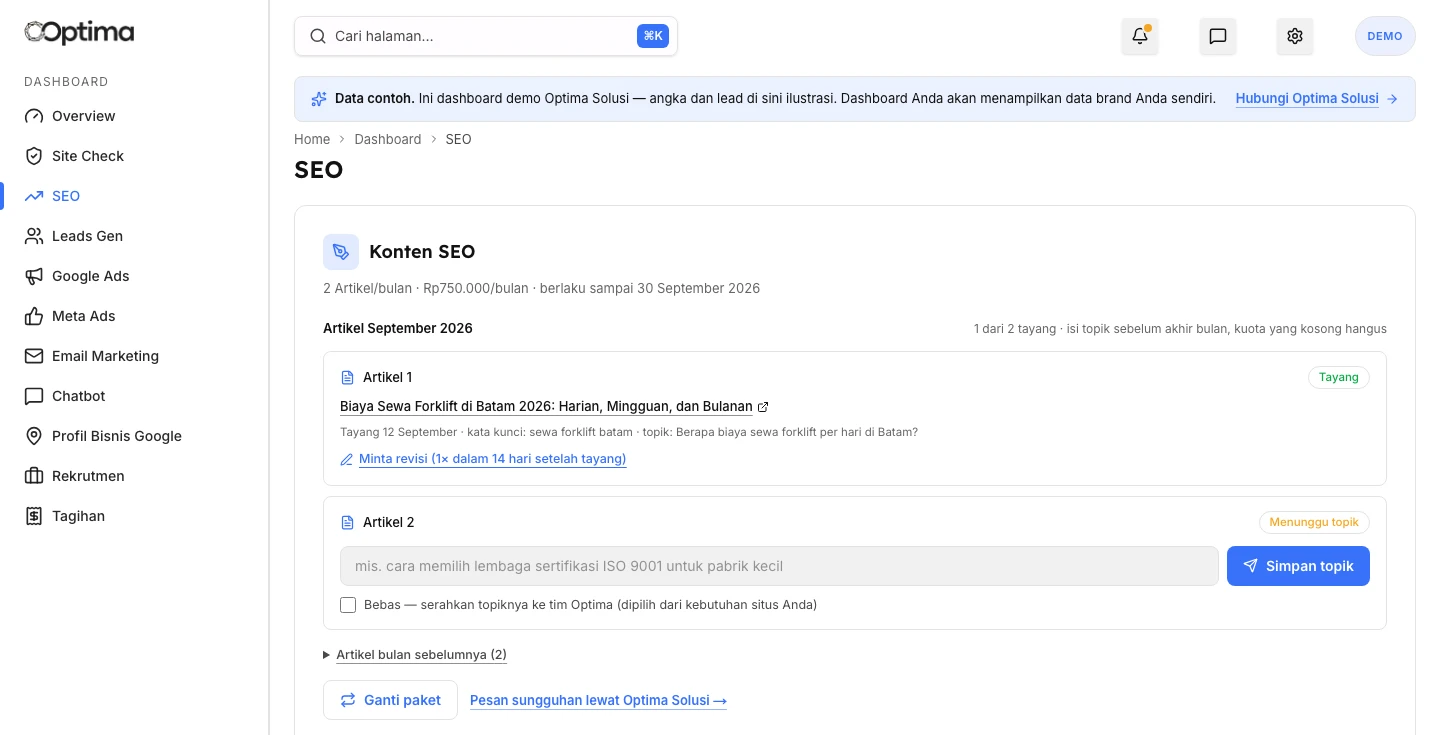
Content SEO card in the Optima client dashboard: published article status, a slot waiting for a topic, and a revision request button

02

Two plan options, a flat monthly price

You're paying for a subscription, not per word or per one-off project.

You subscribe monthly rather than buying single articles. As long as your subscription is active, you're entitled to your plan's article quota every month, with the same research and reporting for both tiers.

SEO Advance

  • 2 Articles/moRp 750.000/mo
  • 4 Articles/moRp 1.400.000/mo

Prices come straight from the same catalog as the Services page.

03

Why the count is capped instead of sold in bulk

Keyword research and standard-compliant writing take time per article, so output can't just be cranked up.

Writing 10 articles a month is easy if there's no research and no standard to meet. What takes time is making sure each article actually targets the right keyword, is written with concrete detail from your business, and passes a quality check before going live.

That's why the plans are capped at 2 or 4 articles a month. Quota you don't use in a given month (you didn't get around to giving a topic) expires at month's end and doesn't carry over, so Optima doesn't pile up an unscheduled backlog of articles owed.

04

What's actually measured: not just "it's published"

Every article gets a stage status based on its age and Google position, not just a publish checkmark.

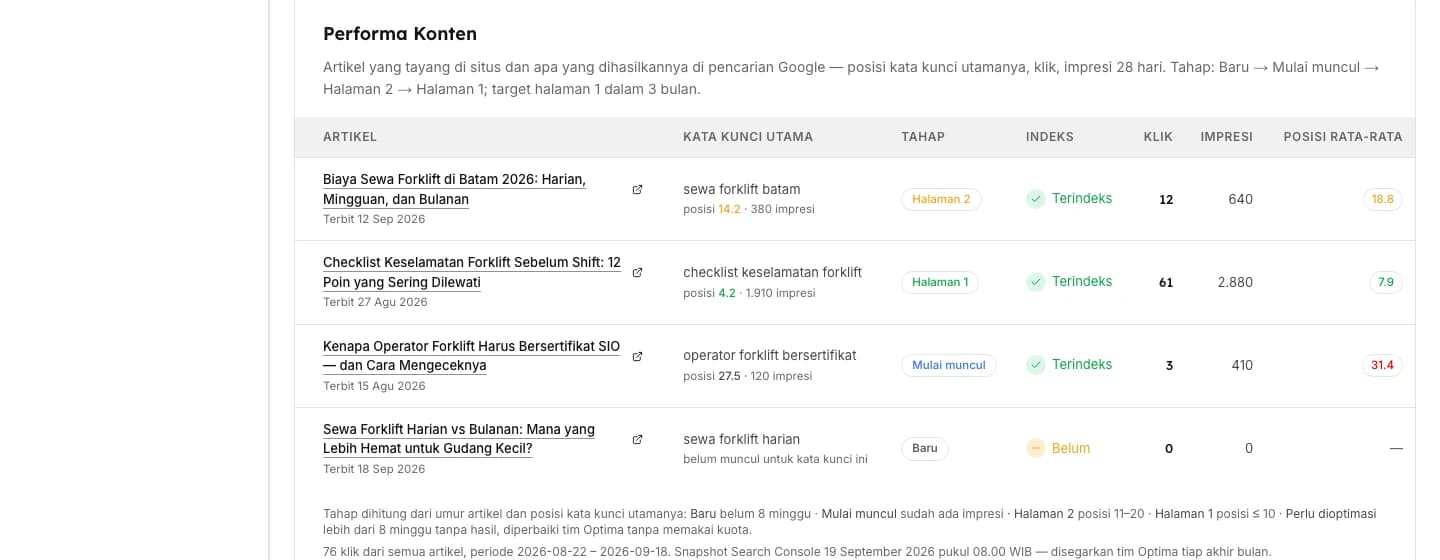
A published article isn't automatically considered done. Each one gets a stage status calculated from its age and its main keyword's Google position: New for under 8 weeks old, Starting to appear once it has search impressions, Page 2 for position 11 to 20, and Page 1 for position 10 or better.

What's tracked is the position of the main keyword set from the start, not an average position across every random keyword the article happens to surface for. Average position is easy to misread, since one article can appear for dozens of irrelevant keywords.

Content Performance block in the Optima dashboard: article stage, index status, clicks, impressions, and main keyword position

05

The promised target: page 1 within 3 months

If that target is missed, the extra work falls on Optima, not your article quota.

The target set for every article is Google page 1 for its main keyword within 3 months of publishing. This is a target, not a guarantee. SEO depends on plenty of things outside any single article's control, including how competitive that keyword is.

If after 8 weeks it's still not indexed, has zero impressions, or sits well outside the top 30, the article gets flagged Needs optimizing. Optima's team fixes it, whether that's the title, structure, or internal links, without touching your quota for new articles that month.

06

Monthly reporting, not just a promise upfront

Clicks, impressions, and position are visible any time, you don't have to ask.

Every article ever published, along with its clicks, impressions, and index status, is in the dashboard whenever you want to check. You don't need to wait for a report to know how it's doing.

Every start of the month, you also get a summary email: which articles went live last month and how they're performing. The data comes from Google Search Console, and the snapshot date is always noted so it's clear which point in time it reflects.

07

You give the topic, we handle the keyword research

You don't need to understand SEO to use this plan, just know what topics matter for your business.

Each month's article slot has a topic field you fill in yourself, for example "how to choose a certification body for a small factory". If you don't have an idea yet, just check "Let Optima decide" and the team picks the topic from unaddressed keyword opportunities, questions that come in through the chatbot, or your own site's content.

You don't have to pick the keyword yourself. That part is handled by Optima using research data, so the article targets a term people actually search for, not one that sounds right but gets no searches at all.

08

See an example first

The demo dashboard shows a simulation of this plan, complete with sample articles at every stage.

You can open the SEO page on the demo dashboard to see a sample article slot and the performance block. If you're already an Optima client, you can start a subscription directly from the SEO page on your own dashboard.

Open the demo dashboard · See the Services page

FAQ

Frequently asked questions

What's the difference between this and just buying an article from a freelancer?
Keyword research is included, the article is published straight to your own site through the same system as your other content, and performance is tracked monthly against a clear target. It's not just a file handed over and forgotten.
What happens if an article never reaches page 1?
After 8 weeks with no results (not indexed, zero impressions, or a distant position), the article is flagged Needs optimizing and fixed by Optima's own team, without using that month's new article quota.
Can I choose the keyword myself?
You provide the topic, and the main keyword is set by Optima from research data so it actually gets searched. If you don't have a topic yet, check Let Optima decide.
Why does unused quota expire instead of rolling over?
So the number of articles Optima has to produce stays on schedule. If quota piled up without limit, the research and writing quality of each article would suffer.
Can I request a revision if something's off?
Yes, once per article, within 14 days of publishing, through the Request revision button in the dashboard.

Want to see Content SEO working for your own business?

Open the demo dashboard first, or go straight to a free consultation to get started.

Free Consultation